
Prospect Research
What Makes a Prospect List Worth Trusting? 7 Checks Before You Buy
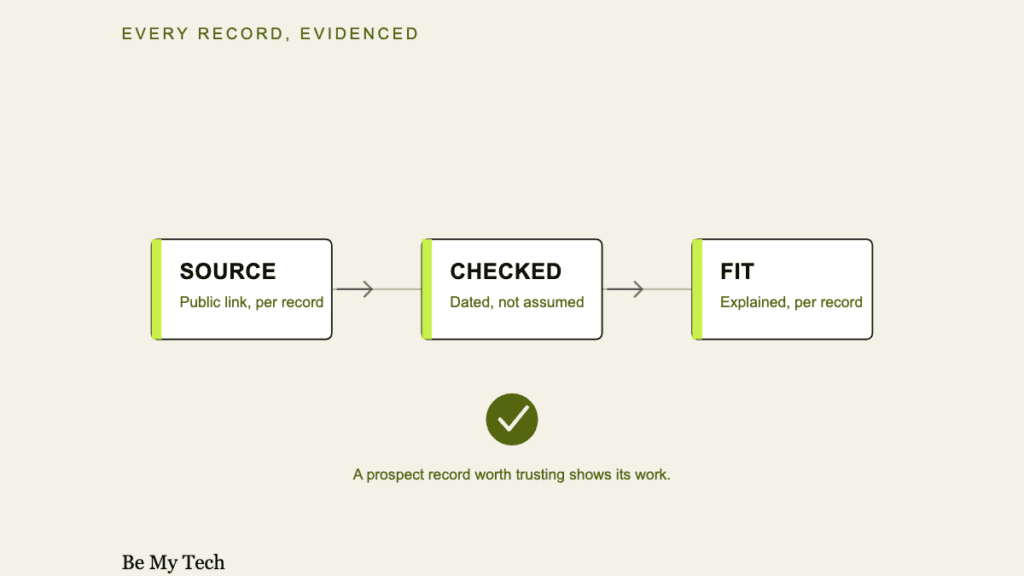
A prospect list can look impressive, with hundreds of rows, tidy columns and a confident-sounding name, and still be commercially useless. The list that wastes your time usually isn’t the obviously bad one. It’s the one that looks fine until you start calling.
What makes a prospect list trustworthy comes down to seven checks. Is the target scope actually defined? Is the source shown? Is there a checked date? Is the fit explained? Is contact availability stated honestly? Are exclusions disclosed? And can you verify a record yourself in under a minute? Miss two or three of these and volume stops mattering, because you’re paying for names, not prospects.
Written by Shahab Shabbir, founder of Be My Tech.
What a prospect list should actually help you decide
A useful prospect list isn’t a stack of contacts. It answers one question: is this specific business worth my time today? That means every record has to do three jobs at once. It identifies a real company, shows why that company matches what you sell, and tells you honestly what you can and can’t reach them with.
Three terms get used loosely, so it helps to separate them:
- A contact is a name, phone number or email with no context about fit.
- A company record is firmographic data (size, industry, location) with no outreach path.
- A prospect is a company matched to your specific buyer criteria, with a stated reason it fits and whatever public contact information legitimately exists.
Only the third is worth paying for. The first two are raw materials you’d still have to qualify yourself.
Why volume is not quality
A 5,000-row list sounds like more value than a 50-row list. In practice the opposite is often true. Every record that doesn’t match your buyer, whether it’s the wrong size, the wrong geography, a closed business or the wrong decision-maker, costs you the same few minutes to check and discard as a record that would have converted. Padding a list with borderline or mismatched companies doesn’t add prospects. It adds cleanup work and quietly lowers the return on every hour you spend on outreach.
Industry research on B2B contact data consistently finds meaningful annual decay in static databases. Commonly cited estimates put email and phone accuracy loss in the double digits per year, largely because people change roles roughly every 12 to 18 months (see the sources at the end). That isn’t a reason to distrust all data. It’s a reason to ask when a record was checked, not just whether it exists.
The SOURCED Check: seven questions before you buy any prospect list
We built this checklist because it’s the same standard we hold our own research to. Every field below is a field we put on our own records. Use it on us, or on anyone else.
The SOURCED Check
Seven questions to ask before you buy a prospect list
S
Scope: is the target market clearly defined?
O
Origin: is the public source shown for each record?
U
Up-to-date: is there a date the record was checked?
R
Relevance: is the fit reasoning specific, not generic?
C
Contact honesty: is missing contact data marked, not guessed?
E
Exclusions: are disqualifiers and limits disclosed?
D
Do-it-yourself: can you verify the source in one click?
Be My Tech · bemytech.com/prospects
S for Scope: is the target clearly defined?
A trustworthy list starts from criteria you gave, not a generic industry export. If a provider can’t tell you what targeting criteria produced this exact list, the “fit” is retroactive: it was decided after the data was pulled, not before.
Warning sign: the provider can’t describe your targeting criteria back to you in their own words.
Ask: “What specific criteria did you use to select these companies?”
Good evidence looks like: a written targeting brief you approved before research started.
O for Origin: is the public source visible?
Every record should link to where the information came from, whether that’s a business website, a directory listing or a public filing, and not just claim to be “verified.”
Warning sign: “verified” or “confirmed” with no link, no citation and no way to check it yourself.
Ask: “Can I see the source for this specific record?”
Good evidence looks like: a clickable source per row, not a one-line disclaimer at the bottom of the file.
U for Up-to-date: is there a checked date?
A source without a date tells you nothing about freshness. A business’s phone number, hours or ownership can change, and the only way to know a record still holds is to know when someone last looked.
Warning sign: no date field anywhere, or a single “list generated on” date that doesn’t reflect per-record checks.
Ask: “When was this specific record last checked, not just when was the list compiled?”
Good evidence looks like: a per-record “checked” date next to the source link.
R for Relevance: is the fit reasoning explained?
“Matches your industry” isn’t a reason. A trustworthy record explains, in a sentence, why this specific company fits your specific criteria.
Warning sign: every record has an identical, copy-pasted fit explanation.
Ask: “Why does this business match what I told you I sell to?”
Good evidence looks like: a short, record-specific note, for example “independent clinic in your target metro; site shows in-house billing, matching your stated buyer profile.”
C for Contact honesty: is availability stated honestly?
Not every business publishes a phone number, an email or an owner’s name, and a trustworthy provider says so instead of filling the blank with a guess.
Warning sign: every single record has a “verified” personal email, with no blanks anywhere. Real public data is never that complete.
Ask: “Do you ever guess an email pattern or infer a name that isn’t publicly listed?”
Good evidence looks like: some fields legitimately blank and marked as such, rather than invented.
For a step-by-step method to score whether a single contact was verified or guessed, see the No-Guessed-Contacts Review Framework.
E for Exclusions: are limits and disqualifiers clear?
A provider who never excludes anything isn’t filtering. They’re forwarding. Ask what gets removed before it reaches you: closed businesses, duplicates, out-of-criteria companies and weak matches.
Warning sign: the provider can’t name a single thing they’d exclude from a list.
Ask: “What would disqualify a company from this list, and do you remove those before delivery?”
Good evidence looks like: a stated review step where mismatches are removed, not padded in to hit a count.
D for Do-it-yourself: can you verify it in one click?
The fastest trust test is also the simplest. Pick any record and check the source yourself. If the citation is vague, missing or leads nowhere useful, everything above it is unverifiable too.
Warning sign: sources described in general terms (“public directories,” “web research”) instead of a specific, clickable link per record.
Ask: “Can I verify this exact record myself right now?”
Good evidence looks like: you click the source, and it takes under a minute to confirm that the record is real.
An annotated illustrative record
Illustrative example. Fictional business, not a real Be My Tech customer or client.
| Business | Lakeside Dental Studio, Plano, TX (fictional) |
| Target criterion | Independent dental practices, 1 to 3 locations, Dallas-Fort Worth metro |
| Source | Practice website “About” page (link included in a real delivery) |
| Checked | 2026-07-15 |
| Why it fits | Independent single-location clinic in the target metro; services page shows in-house billing, matching the stated buyer profile |
| Public contact | Phone and general email listed publicly; owner name publicly listed on the site |
| Exclusion or caveat | Direct owner cell phone isn’t public, so it was left blank and not guessed |
| Confidence | High |
Notice what isn’t here: a guessed personal cell number, a generic “great fit!” note, or a source described only as “verified database.” Every field either has evidence or is honestly marked as unavailable.
Custom prospect research versus buying a database
Neither approach is universally right, because they solve different problems. A large self-serve database is a reasonable tool when you need broad reach and can do your own filtering. Custom research is the better tool when fit matters more than volume and you don’t have hours to qualify a spreadsheet yourself.
| Self-serve B2B database | Custom prospect research | |
|---|---|---|
| Best for | High-volume outbound, broad ICPs, teams with their own qualification process | Focused targeting, smaller lists, teams that want fit decided before delivery |
| Typical scale | Thousands of records, self-exported | Tens to low hundreds, hand-reviewed |
| Fit decision | Made by you, after export, using filters | Made by the provider, before delivery, against your stated criteria |
| Freshness | Varies by provider refresh cycle | Checked at time of research, dated per record |
| Where it can go wrong | Filters miss nuance a human would catch, and volume hides mismatches | Smaller total reach, and not a fit if you need thousands of contacts this week |
Be My Tech is built for the second column, which is also why we don’t sell unlimited-volume access. If you need 10,000 contacts by Friday, a database is the right tool, not us.
Red flags before you buy any list
- No visible source per record, only a general claim of “verified” or “researched”
- No checked date, or a single list-level date instead of per-record dates
- Vague fit reasoning repeated identically across every row
- Every field fully populated with no blanks, when real public data is never that complete
- Guaranteed personal contact details, private numbers or direct emails for every record
- Huge volume with no explanation of how it was filtered or reviewed
- No stated exclusions, so nothing was ever removed for being a weak match
- No sample offered before you commit to paying
- Pricing hidden until you talk to sales
- Any promise of replies, meetings or sales as a guaranteed outcome
Pricing
The Target Account Intelligence Sprint covers 50 researched U.S. B2B accounts for $499, with a five-account calibration before full-scale research. The price covers researched, reviewed, source-cited records matched to the criteria you provide. What varies is how long research takes for an unusual or narrow market. If your criteria need extra time, you’re told before you have to ask, not after you’ve paid. Current fit, scope and pricing are confirmed before you commit. For a full breakdown of what drives price and how it compares with database subscriptions and other models, see How Much Does Prospect Research Cost?
Who this is for
This service tends to fit businesses that already know what they sell, can describe their target criteria in a sentence or two, and would rather review a focused, evidence-backed list than sift through a large export themselves. If evidence and fit matter more to you than raw volume, review how the research works and what each delivered record contains before ordering.
Who this is not for
Be direct with yourself here. This isn’t the right fit if you need thousands of contacts immediately, require guaranteed personal cell numbers or private emails as a baseline, want a self-serve searchable database you can query yourself, or are looking for guaranteed replies, meetings or sales. No honest provider, including us, can promise any of those.
Limitations, stated plainly
Public information can be incomplete, and some businesses simply don’t publish a phone number, email or owner name. Those fields stay blank rather than guessed. Company information also changes after the checked date. Fit quality depends heavily on how specific your criteria are, and vague criteria produce a vaguer list. No research service, this one included, can guarantee a reply, a meeting or a sale, and respectful, compliant outreach is the buyer’s responsibility once the list is delivered.
How to review quality before ordering
Before ordering, review how the research works and what each delivered record contains. Be My Tech confirms your targeting criteria before payment so both sides are clear about what counts as a useful prospect.
The seven-check standard, in one place
Scope, Origin, Up-to-date, Relevance, Contact honesty, Exclusions and Do-it-yourself verification make up the SOURCED Check. Run it against any list before you pay for it, ours included.
See how prospect research works
Once you know what to check in a record, the next question is which sourcing option to use in the first place. See B2B Lead Lists vs. Custom Prospect Research: Which One Should You Use? and, for ranking the accounts you end up with, How to Prioritize Target Accounts Before Outreach.
Frequently asked questions
What exactly is a “prospect,” as opposed to a contact or a lead?
A prospect is a specific business matched to your stated criteria, with a source-cited, date-checked reason it fits. It isn’t a raw database row, and it isn’t a “qualified lead” claim.
How should you judge the research standard before ordering?
Review how the research works, what each delivered record contains, and how the targeting criteria are confirmed before payment.
Does a source-cited record mean the contact information is guaranteed accurate forever?
No. It means the source and check date are shown so you can judge freshness yourself, and public information can still change after that date.
Sources: industry commentary on B2B contact data decay and role-change frequency referenced above is drawn from multiple 2026 data-quality industry publications (Cleanlist, Landbase, Prospeo, Airscale). The figures are presented as commonly cited industry estimates, not as Be My Tech’s own measured statistics.